https://evepraisal.com/
Description
Evepraisal is a website by Magerawr on which it is possible to quickly obtain an estimation of buying or selling prices for one or many items.
It directly uses the game's database to extract market data, or it uses CCP estimated prices for items with low or no market volume. It also provide an hyperlink that can be shared with other players (in a contract, in a chat in game or out of the game), allowing them to confirm the estimated prices.
It is a widely used tool in the Eve Online community. It is often used as a reference to establish the prices of certain contracts. For example, the buy back programs of many alliances use this tool to fix the prices of the buy back contracts. This is the case for the Sorry in Advance's buy back program.
The site allows you to register if you want. This remove the ads banners and keep a history of your price's researches.
WARNING : we recommend that you avoid connecting your Eve Online account to a website if it is not mandatory. Also, if you choose to connect your Eve Online account on a website, be sure to check what access are requested, and make sure that you are comfortable sharing those information with the website.
Presentation of the website and the interface
The purpose of this presentation is to explain the main functionalities of the Evepraisal. Other functionalities are available and we invite you to explore the site by yourself to discover them.
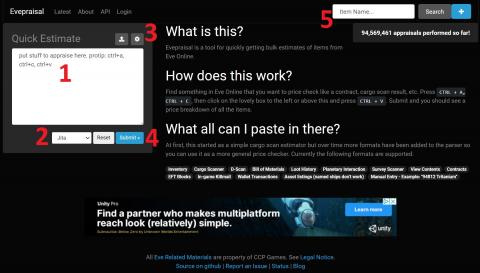
- Stuff to appraise section
- Commercial hubs dropdown list
- Research settings
- Submit button
- Searchable field for unique item research
How to use the tool
1. Add the items you want to appraise
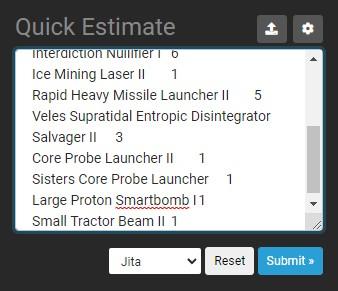
- You have to put the items in this format : [NAME OF THE ITEM] [NUMBER OF THE ITEM). WARNING : The item's names must be the English ones !
- For example, if you're looking for the selling price of 2 Vexor ships, you have to write Vexor 2.
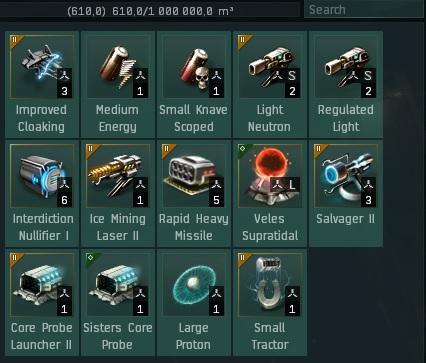
- You can use the copy and paste function to import your items list from the game :
- In your inventory, select all the items to appraise. (You can use the CTRL A shortcut to select all the items in one step.)
- Then, use the CTRL C shortcut to send your selection in memory.
- Finally, use the CTRL V shortcut to paste your items list on Evepraisal.
2. Select the commercial hub for which you want to obtain an estimation
- Use the dropdown list, at the bottom of the items list section, to choose the commercial hub for which you want ot obtain a price estimation. You can choose one of the 4 main commercial hubs of the game (Jita, Amarr, Dodixie, Rens), Perimeter, or obtain a universe wide price.
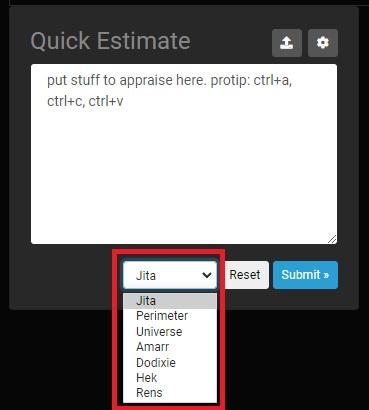
3. Adjust the settings of the research, if needed
- By clicking on the gear icon, just above the items list section, you'll open the appraisal settings window. From all the options available, the pricing percentage will probably be the only one you'll use. It allows you to apply a specific percentage on the final price results. By default, the percentage is 100 %.
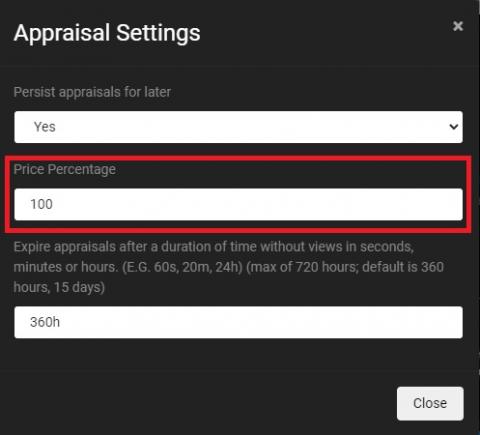
- For example, many alliances buy back programs specify that items are buy at a specific percentage of the Jita buy price (ex. : 80 %). You can enter this specific percentage in the "Price Percentage" appraisal setting. Then, the results will automatically be adjusted according to the specified percentage.
- WARNING : depending of your web browser's settings, if you specify a specific percentage instead of 100 %, it may be saved in memory for your next researches. Be sure to check the percentage before every research to avoid wrong prices.
4. Click on the "Submit" button to get your research results
5. Find the desired information in the results
- This is the look of a research results :
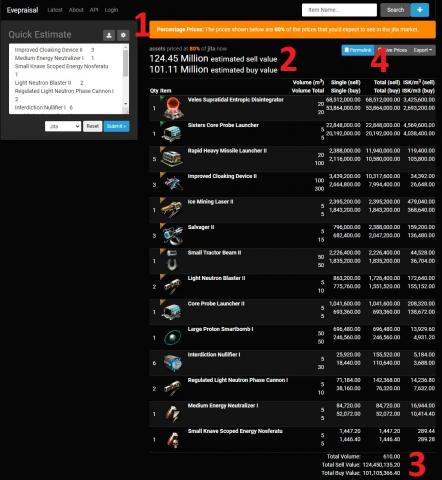
- If you specified a different than 100 % percentage in the appraisal settings, it will be highlighted at the top of the screen, in an orange banner.
- The rounded up value of the selected items will appear at the top of the screen. It shows the estimated selling price, then the estimated buying price.
- The precise value of the selected items appears at the bottom of the research. That's the non rounded up value of the previous point.
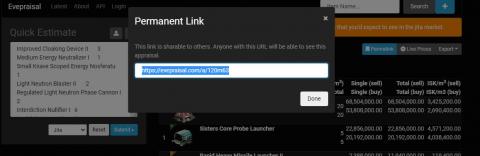
- The "Permalink" button gives access to an hyperlink for the research you just did. More details about this in the next section.
6. Get the hyperlink (permalink) of your research
- You can obtain an hyperlink that will allow people using it to see your research's exact results. This is especially useful to confirm the market selling prices of selected items to someone who want to buy them. In addition, between the time you have prepared a contract and the time the buyer accepts it, prices may have changed. Your hyperlink will confirm to the buyer the exact price of the items at the moment the contract was set up.
- To get this hyperlink, that is called "Permalink" on Evepraisal, click on the "Permalink" blue button on the results page. The permalink window will then appear. You'll just have to copy the link (CTRL C) and paste it (CTRL V) where you want, like in the contract's comments or in a chat on Discord.